
Editions and Licensing: Free Edition vs Pro Edition
The plugin comes in a free edition and a Pro edition. The free edition loads and renders all supported data formats normally. Some features require registering an App Key to license the Pro edition before they can be used.
Pro-only Features
Only the features below require a license; everything else is available in the free edition.
| Feature | Free edition | Pro edition | Notes |
|---|---|---|---|
| Tiled rasterization (experimental) | — | ✓ | Can raise rendering performance, the gain depends on the scene; falls back to Pipeline without a license |
| ProxyMesh physically based relighting | — | ✓ | Falls back to the Fixed normal mode without a license |
| Self-shadowing for Gaussian splats | — | ✓ | Occlusion shadows cast by the 3DGS itself |
| More realistic lighting and shadow interaction | — | ✓ | Lighting response driven by real normals |
| Working color space conversion | — | ✓ | Required for film, broadcast and virtual production workflows |
| ACES workflow support | — | ✓ | Takes effect together with working color space conversion |
| Color matching between captured environments and CG elements | — | ✓ | Same as above |
| Load volumes | — | ✓ | Data loads over its full extent without a license |
| Clipping volumes and section planes | 50 of each type | Unlimited | The free quota covers everyday use; heavy use needs a license |
Using a restricted feature without a license does not cause a load failure or an error. The plugin falls back to free edition behavior automatically.
Full Feature Comparison
The Pro edition includes every free edition feature. The rows that show a difference below are exactly the licensed scope.
| Feature | Free edition | Pro edition |
|---|---|---|
| Data format support | ||
All formats: .lcc2 / .lcc / .sog / .spz / .ply | ✓ | ✓ |
| 3DGS scene loading with no point-count limit | ✓ | ✓ |
| Rendering and performance | ||
| Tiled rasterization (experimental) | — | ✓ |
| Performance control system | ✓ | ✓ |
| Depth rendering support | ✓ | ✓ |
| NVIDIA DLSS support | ✓ | ✓ |
| Native collision for XGRIDS scans | ✓ | ✓ |
| 3DGS and point cloud render modes | ✓ | ✓ |
| Perspective and orthographic projection | ✓ | ✓ |
| SH band adjustment | ✓ | ✓ |
| Point cloud data and elevation coloring | ✓ | ✓ |
| Full load rendering | ✓ | ✓ |
| Scene editing | ||
| Basic 3DGS relighting | ✓ | ✓ |
| Mixed rendering of 3DGS, meshes and effects | ✓ | ✓ |
| Clipping volumes and section planes | 50 of each type | Unlimited |
| Load volumes | — | ✓ |
| Navigation System support | ✓ | ✓ |
| Loading animation | ✓ | ✓ |
| Single Layer Water support | ✓ | ✓ |
| Physically based relighting | ||
| ProxyMesh physically based relighting | — | ✓ |
| Self-shadowing for Gaussian splats | — | ✓ |
| More realistic lighting and shadow interaction | — | ✓ |
| Post-processing | ||
| Depth of Field | ✓ | ✓ |
| Model exposure control | ✓ | ✓ |
| Color Correction Region support | ✓ | ✓ |
| Post Process Volume support | ✓ | ✓ |
| Color adjustment | ✓ | ✓ |
| Professional color management | ||
| Working color space conversion (film, broadcast, virtual production) | — | ✓ |
| ACES workflow support | — | ✓ |
| Color matching between captured environments and CG elements | — | ✓ |
| OpenColorIO color management | ✓ | ✓ |
| XR and virtual production | ||
| High-fidelity VR streaming | ✓ | ✓ |
| Native nDisplay support | ✓ | ✓ |
| Multi-camera / SceneCapture support | ✓ | ✓ |
| 360-degree panoramic output | ✓ | ✓ |
| Digital twins and simulation | ||
| Cesium for Unreal support | ✓ | ✓ |
| CARLA simulator support | ✓ | ✓ |
| Platforms | ||
| Windows / Linux packaging | ✓ | ✓ |
Working Color Space Conversion
Before 3DGS colors are composited back into the image, they go through the SRGB → Linear → InverseACES → working color space conversion chain. Converting to the engine Working Color Space is a Pro edition feature, and both pipelines are subject to this restriction.
Without a license, this step is skipped and the colors are composited without conversion. The engine default working color space is sRGB, where the results before and after conversion are identical, so the free edition and the Pro edition look the same. After the working color space is changed to a gamut other than sRGB (for example to match an ACES workflow or OpenColorIO), unlicensed 3DGS colors deviate from regular objects in the scene.
Register an App Key
The free edition requires no registration, so this section can be skipped.
- Click the LCC button on the editor toolbar to open the LCC4Unreal Panel.
- Click to copy the AppId in the Pro area.
- Go to the XGrids developer platform to request an AppKey.
- Paste the received key in the App Key area.
- Click Apply.
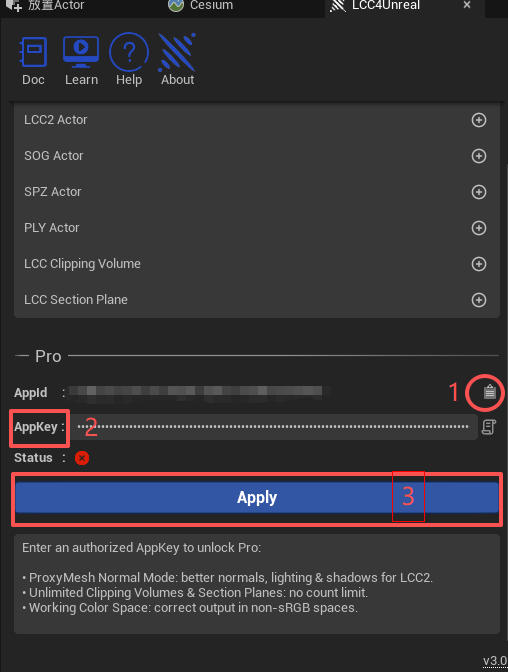
Enter and apply the App Key in the LCC4Unreal panel
The App Key is bound to the AppId and is saved in the project configuration after registration. The same project uses it on Windows, Linux, and Quest3, with no need to register again per platform.
Note: confirm the license is still valid before packaging for release, otherwise the restricted features in the packaged output fall back to free edition behavior.
Verify the License Status
Once the license takes effect, the Pro area of the LCC4Unreal Panel shows a licensed state.