XGRIDSDocs
  • 简体中文
  • English
  • 繁體中文
  • 日本語
  • Deutsch
  • Español
  • Italiano
  • Français
  • Русский
  • 简体中文
  • English
  • 繁體中文
  • 日本語
  • Deutsch
  • Español
  • Italiano
  • Français
  • Русский
  • PortalCam

    • Product Overview
    • Basic Operation
    • Using the LCC Scan App
    • Maintenance and Care
    • FAQ
  • Lixel K Series

    • Lixel K1

      • Product Overview
      • Basic Operation
      • Device Activation and Connection
      • Scanning Workflow
      • Acquire Point Cloud Data with Absolute Coordinate
      • Map Fusion
      • Route Planning Suggestions for Typical Scenes
      • Precautions
      • FAQ
    • Lixel K2

      • Product Overview
      • Basic Operation
      • Device Activation and Connection
      • Scanning Workflow
      • Acquire Point Cloud Data with Absolute Coordinate
      • Map Fusion
      • Route Planning Suggestions for Typical Scenes
      • Precautions
      • FAQ
  • Lixel L Series

    • Lixel L2 Pro

      • Product Overview
      • Basic Operation
      • Device Activation and Connection
      • Scanning Workflow
      • Acquire Point Cloud Data with Absolute Coordinate
      • Measure Point
      • Appendix
      • FAQ
  • Lixel Studio

    • Version and Copyright
    • Installation and Activation
    • Software Interface
    • File Operations
    • Project Processing
    • Tools
    • 2D Drawing
    • Applications
    • Settings
    • Device Connection
  • Lixel CyberColor

    • LCC Studio

      • Getting Started
      • Version and Updates
      • Download and Installation
      • Interface Overview and Navigation
      • Before Reconstruction
      • Model Reconstruction
      • Single Model Reconstruction
      • Map Fusion
      • Aerial-Ground Fusion
      • Aerial Reconstruction
      • My Models
      • Other Features
      • Settings and Account
      • Converter
      • Video Reconstruction
      • FAQ
    • LCC Scene Editor

      • Version & Updates
      • Account & Login
      • Product Overview & Home
      • Editor Interface
      • Scene Navigation Modes
      • File
      • Settings
      • Edit Operations
      • Window
      • Global Toolbar
      • Assets & Properties
      • Left Toolbar
      • Viewpoints
      • Portal
      • Skybox
      • Annotations
      • Measurement
      • Flythrough
      • Scene Report
      • 3D Layout
      • Mini-Map
      • Preview Mode (Viewer)
      • Help
      • FAQ
      • Spawn Point
    • LCC Model Editor

      • Version and Updates
      • User Guide
      • Overview and Interface
      • File Operations
      • Selectors
      • Editing Models
      • Measurement
      • Color Grading
      • Asset Management
      • Settings and Help
      • FAQ
    • Capture Guide

      • Overview
      • Capture Devices Overview
      • General Capture Principles
      • Indoor Scene Capture
      • Outdoor Scene Capture
      • Large-Scale Capture (Map Fusion)
      • Aerial-Ground Map Fusion Capture
      • Object Capture
      • People Capture
      • Video Reconstruction Capture
      • HD Enhancement
      • Control Points (Lixel P1)
      • FAQ and Troubleshooting
    • Version History
  • Plugin & SDK

    • Unreal

      • Introduction
      • Quick Start - Windows
      • Quick Start - Linux
      • Quick Start - Quest3
      • Editions and Licensing
      • Rendering
      • Visual Settings
      • Normals and Lighting
      • Scene Editing
      • Performance Parameters
      • Performance Guide
      • Third-party and Engine Plugin Integration
      • Proxy Mesh
      • Loading Animation
      • Collision
      • Navigation System Support
      • Single Layer Water Support
      • Localization
      • FAQ
      • Troubleshooting
      • Logging and Diagnostics
      • Contact Us
      • API Reference

        • ALCCActorBase
        • ULCCComponentBase
        • ULCCComponent
        • ULCC2Component
        • SOG / SPZ / PLY Actors
        • ALCC2ProxyMesh
        • ALCCClippingVolume
        • ALCCSectionPlane
        • ULCCUtilLibrary
        • Enums
        • Structs
      • Changelog

        • v3.3.1
        • v3.0.0
        • v2.2.1
        • v1.0.0
        • v0.9.0
        • v0.8.0
        • v0.7.1
        • v0.6.1
        • v0.5.2
        • v0.4.1
        • v0.4.0
        • v0.3.0
        • v0.0.5
        • v0.0.4
        • v0.0.3
        • v0.0.2
        • v0.0.1

LCC Unreal Plugin Introduction


Website Download GitHub Discord

LCC Unreal Plugin (LCC4Unreal) is a 3D Gaussian Splatting (3DGS) rendering plugin developed by XGRIDS on Unreal Engine 5. It imports, renders, and supports interaction with multiple 3DGS data formats inside UE5.

Supported Versions

VersionSupported Engine
v1.0.0 and aboveUnreal Engine 5.4 ~ 5.8
Below v1.0.0Unreal Engine 5.1 ~ 5.7

Supported platforms:

  • Development on Windows: packages Win64, and cross-compiles to Linux x86
  • Development on native Linux: packages Linux x86

Note: released plugin packages are built against engines published by Epic, including the prebuilt version installed through the Epic Games Launcher and source builds compiled from unmodified official source. Vendor-customized branches (such as the NVIDIA RTX branch), commercial engines derived from UE (such as Pixotope), and engines with locally modified source cannot use the official plugin packages directly and require a custom build. See Custom Engine Versions.

Supported Formats

FormatExtensionDescription
LCC2.lcc2XGRIDS proprietary format and the current primary format. Supports depth, LOD, and an octree structure
LCC.lccXGRIDS proprietary format, superseded by LCC2
SOG.sogIntroduced by PlayCanvas. Uses the LCC2 pipeline, supports depth, no LOD
SPZ.spzIntroduced by Niantic Labs, compatible with v2/v3/v4. Uses the LCC2 pipeline, supports depth, no LOD
PLY.plyStandard 3DGS point cloud format. Uses the LCC2 pipeline, supports depth, no LOD

Two Rendering Pipelines

The plugin ships two rendering implementations, referred to as the LCC pipeline and the LCC2 pipeline. The format determines which pipeline the data goes through:

PipelineFormatsCharacteristics
LCC2.lcc2 / .sog / .spz / .plyCurrent primary pipeline. Outputs depth and participates in occlusion tests; all visible data is merged into a single buffer and submitted in one draw call
LCC.lccEarlier implementation, used only for loading .lcc data. Does not output depth, and submits one draw call per node

Feature coverage differs between the two pipelines: some parameters are available on only one pipeline and are hidden in the Details panel of the other. Each document marks the pipeline a parameter belongs to.

Corresponding Actors

ActorPipelinePurpose
ALCC2ActorLCC2Loads the .lcc2 format
ALCCActorLCCLoads the .lcc format
ASogActorLCC2Loads a single .sog file
ASpzActorLCC2Loads a single .spz file
APlyActorLCC2Loads a single .ply file

Getting the Plugin

LCC Unreal Plugin download

Plugin Directory Structure

LCC4Unreal plugin directory structure
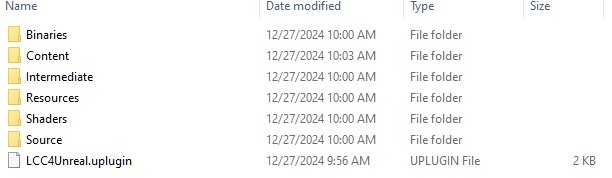
LCC4Unreal plugin directory structure

LCC4Unreal plugin files and subdirectories

LCC4Unreal plugin files and subdirectories

Directory / FileDescription
BinariesBinary libraries
ContentPlugin assets (materials and others)
IntermediateBuild intermediates (UHT-generated headers and code, do not delete)
ResourcesIcon assets
ShadersRendering shaders
SourceModule source definitions
LCC4Unreal.upluginPlugin descriptor file

Coordinate System

LCC data uses a Z-up right-handed coordinate system and UE uses a Z-up left-handed system. No extra handling is normally required.
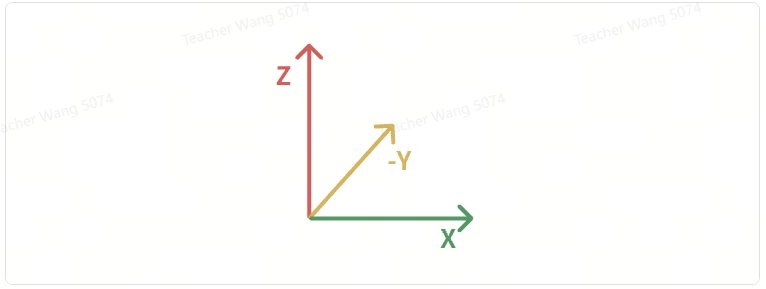
LCC and Unreal Engine coordinate systems compared

LCC and Unreal Engine coordinate systems compared

For Y-up PLY files, rotate the Actor 90 degrees around the X axis.

Feature Overview

  • Multi-format 3DGS rendering (LCC/LCC2/PLY/SOG/SPZ)
  • Dual rendering modes: 3DGS and point cloud
  • Multiple normal generation modes (Fixed/ViewFacing/Hemispherical/ProxyMesh)
  • Scene lighting interaction (Lit/Unlit)
  • Color adjustment (saturation/contrast/gamma/offset/tint)
  • Shadow receiving (experimental)
  • Clipping volumes and section planes (up to 65536 each, 50 each in the free edition)
  • Dynamic collision data loading
  • GIS geographic placement (Cesium integration)
  • Loading animation
  • nDisplay support
  • VR stereo rendering
  • DLSS support
  • Navigation System support
  • Single layer water support
  • OpenColorIO color management
  • Multi-camera / SceneCapture support
  • Full load rendering mode (automatic merge for small scenes)
Next
Quick Start - Windows


